![Exizent_logo_non-fixed_White_Large.png]](https://knowledge.exizent.com/hs-fs/hubfs/Exizent_logo_non-fixed_White_Large.png?height=45&name=Exizent_logo_non-fixed_White_Large.png)
Where is the Additions and Deductions page?
To access:
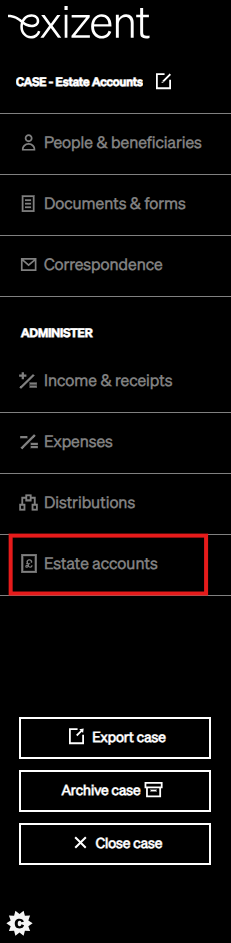
- Click Estate accounts on the left hand side menu within Estate overview
- Click on Export at the bottom of the left hand side menu within Estate accounts
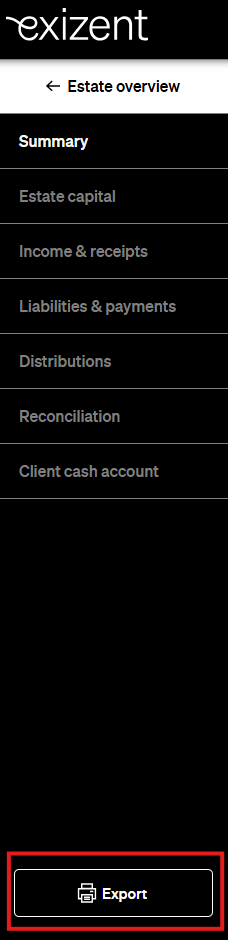
- Choose if you want to export as a PDF or Excel document
- The Additions and Deductions page will follow the General Information, Report on the estate, Balance Sheet and the Estate at date of death pages in the PDF version and show in the fifth tab along in the Excel document
What makes up the Additions and Deductions Page?
- The first section on this page will consist of any Gains on sale of assets, Sums received and Receipts under the heading of Additions
.png?width=670&height=567&name=20260420%20-%20Additions%20and%20Deductions%20Page%20(Additions).png)
💡When the type of payment received has been chosen as Income, it will show in the next section of the Estate Accounts export, titled Income. See here for more information on adding income to a case.
-
Under the Deductions heading, the first items to be shown will be any dividends or accrued interest included for inheritance tax only, along with any Loss on sale of assets or Loss on repayment of liabilities.
.png?width=670&height=365&name=20260420%20-%20Additions%20and%20Deductions%20Page%20(Deductions%201).png)
- This will be followed by any Tax expenses (Inheritance, Capital Gains and Income) that have been added in the expenses section
⚠️Any Tax expense related to income will not show here, instead it will be shown in the Income section of the Estate Accounts output
- Expenses linked to sale of asset and Expenses linked to repayment of liability will be displayed next
- Finally all Administration expenses and Other expenses will be shown on the Additions and Deductions page
🔍For all Expenses, you will be able to see the total amount that has been settled, and the total amount that remains unsettled
.png?width=595&height=847&name=20260420%20-%20Additions%20and%20Deductions%20Page%20(Deductions%202).png)
👍If your case does not contain any of the mentioned categories e.g. Tax Expenses or Other Expenses then they will not be shown on the Additions and Deductions page
👷 Our team are regularly making improvements and adding new features. Some things may have changed since this guide was written as functionality gets even more fabulous. If you need further assistance, please contact the Customer Success team who are always happy to help
🖥️ Chat to us through the knowledge base - click the chat icon in the bottom right corner of this page
☎️ Call us on 020 8152 2902
✉️ Email us on support@legal.exizent.com