![Exizent_logo_non-fixed_White_Large.png]](https://knowledge.exizent.com/hs-fs/hubfs/Exizent_logo_non-fixed_White_Large.png?height=45&name=Exizent_logo_non-fixed_White_Large.png)
Overview
-
Pecuniary legacy distributions may be added to your case via 2 methods:
-
A pecuniary legacy entitlement you have added for a beneficiary in the People & beneficiaries section of the case will automatically create a draft pecuniary legacy distribution entry in the Distributions section of the case. See How do I add a beneficiary's entitlement to learn more.
- Where a pecuniary legacy entitlement hasn't been added in the People & beneficiaries section you can add via Distributions
-
1. Distributions where pecuniary legacy entitlement added
- Ensure the pecuniary legacy entitlement has been added for the beneficiary in the People & beneficiaries section of your case. See How do I add a beneficiary's entitlement to learn more
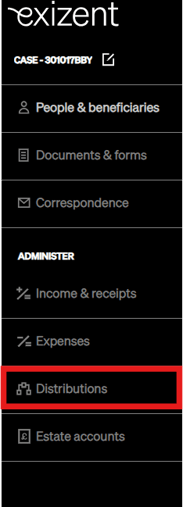
- Click into Distributions
- In the Distributions overview page you should see an entry under the Pecuniary legacies section for the pecuniary legacy due. It will have a date of payment of N/A as it is just a proposed distribution the system has created on your behalf.
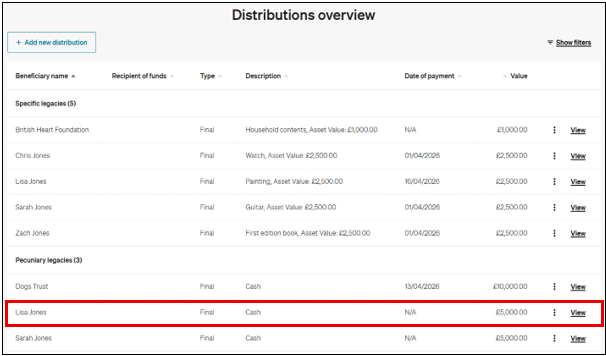
- Click the View button to view the pecuniary legacy distribution
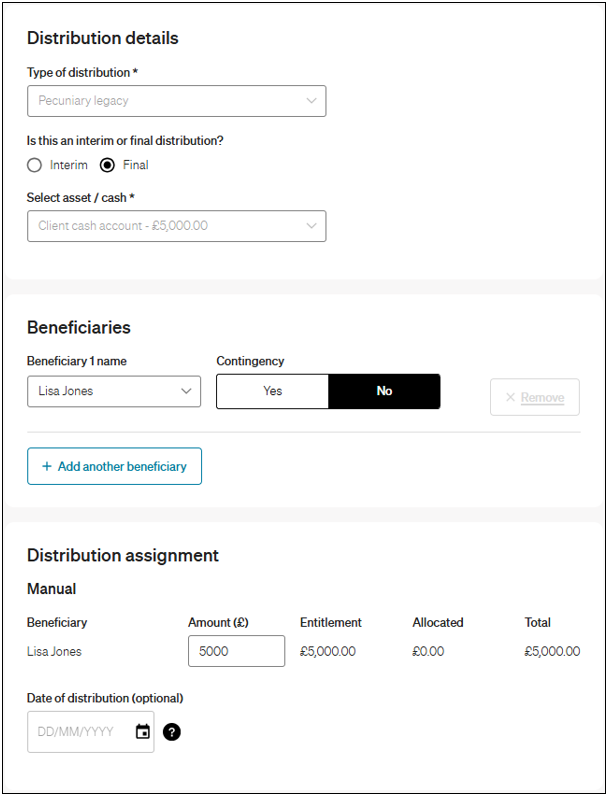
✨ The Allocated column will show any interim pecuniary legacy distributions made when doing a final pecuniary legacy distribution
- Add the Date of distribution (or this can be left blank to leave as a proposed distribution)
- Click Save distribution
2. Adding pecuniary legacy distributions via Distributions
- Click into Distributions
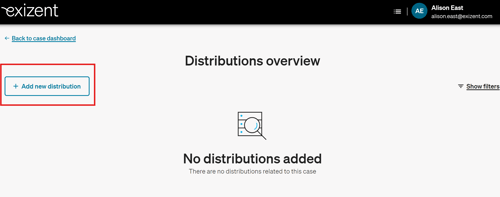
- Click Add new distribution
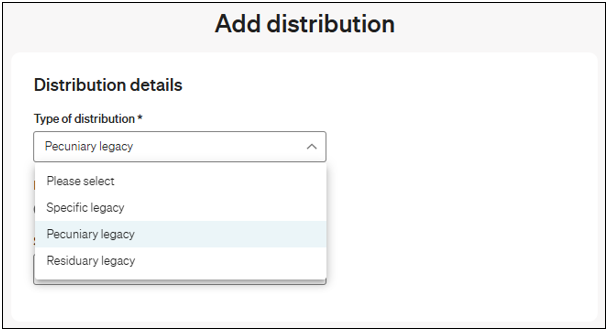
- Choose Pecuniary legacy within Type of distribution
-
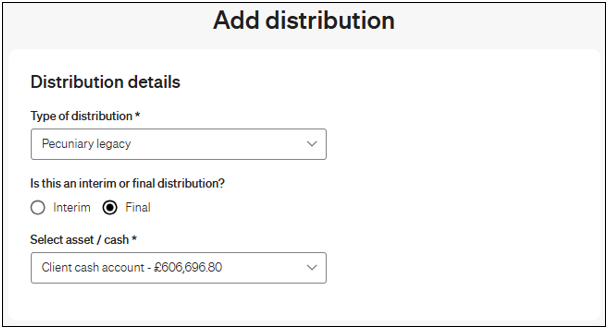
Choose if this is an interim or final distribution
- Choose where to distribute the money from in Select asset/cash
-
Select the beneficiary you’d like to distribute to
-
Choose if this legacy is subject to a trust or contingency
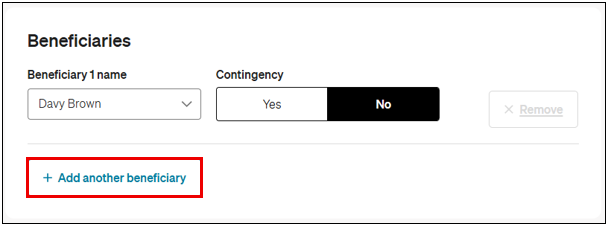
- If more than one beneficiary is required, click Add new beneficiary and repeat as needed
- Enter the value being distributed for the interim or final pecuniary legacy
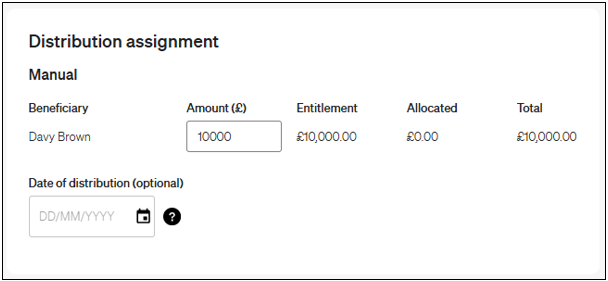
✨ The Allocated column will show any interim pecuniary legacy distributions made when doing a final pecuniary legacy distribution
- Add the Date of distribution (or can be left blank to create a proposed distribution)
- Click Save distribution
View and manage distributions
- You can view and manage pecuniary legacy distributions via the Distributions tab of your case
- To learn more about how to see pecuniary legacy distributions in the estate accounts tabs and outputs, see How do I distribute to beneficiaries?
👷 Our team are regularly making improvements and adding new features. Some things may have changed since this guide was written as functionality gets even more fabulous. If you need further assistance, please contact the Customer Success team who are always happy to help
🖥️ Chat to us through the knowledge base - click the chat icon in the bottom right corner of this page
☎️ Call us on 020 8152 2902
✉️ Email us on support@legal.exizent.com