![Exizent_logo_non-fixed_White_Large.png]](https://knowledge.exizent.com/hs-fs/hubfs/Exizent_logo_non-fixed_White_Large.png?height=45&name=Exizent_logo_non-fixed_White_Large.png)
Setup process
- Check you are operating on V5 of LawWare
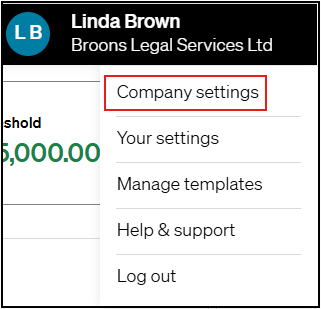
If you're not on V5 yet don't worry, the LawWare team will be able to assist you in upgrading, contact support@lawware.co.uk to schedule your upgrade - In Exizent, a member of your team with Company Administrator permission levels should navigate to Company settings
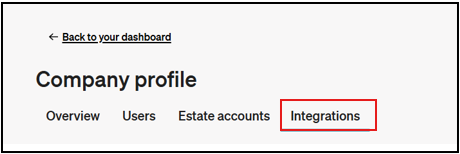
- Select the Integrations tab
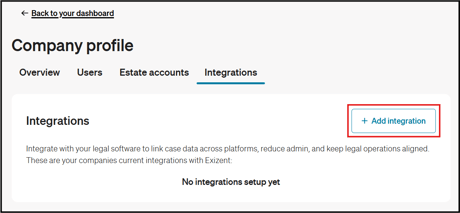
- Click the + Add integration button
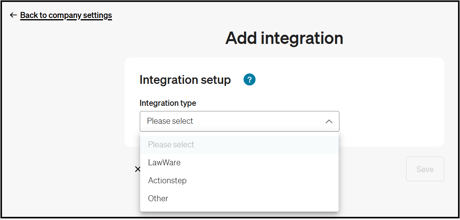
- Select LawWare in the Integration type dropdown
- Follow the onscreen instructions to activate the integration
- Once activated, a dedicated Exizent tab will appear in your LawWare cases. Our knowledge base article explains in more detail how you can start transferring data between the two systems.
🏆 When the Exizent integration is live on a LawWare account, you'll see a new Exizent tab in each matter
👷 Our team are regularly making improvements and adding new features. Some things may have changed since this guide was written as functionality gets even more fabulous. If you need further assistance, please contact the Customer Success team who are always happy to help
🖥️ Chat to us through the knowledge base - click the chat icon in the bottom right corner of this page
☎️ Call us on 020 8152 2902
✉️ Email us on support@legal.exizent.com