![Exizent_logo_non-fixed_White_Large.png]](https://knowledge.exizent.com/hs-fs/hubfs/Exizent_logo_non-fixed_White_Large.png?height=45&name=Exizent_logo_non-fixed_White_Large.png)
Setup process
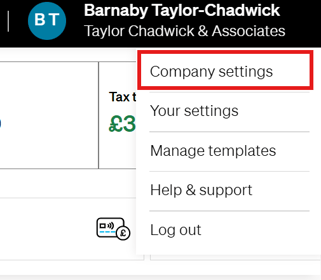
- In Exizent, a member of your team with Company Administrator permission levels should navigate to Company settings
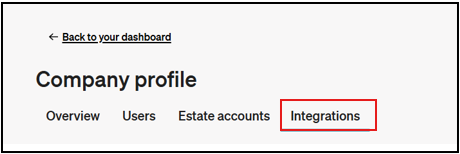
- Select the Integrations tab
-
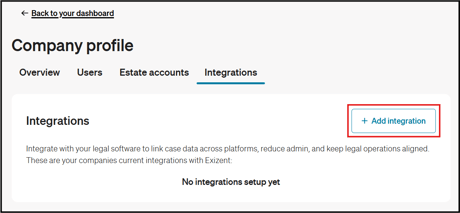
Click the + Add integration button
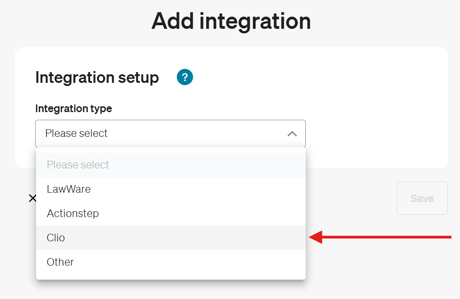
- Select Clio in the Integration type dropdown
-
Click the Log in button to connect your Clio account with Exizent
- Follow the necessary steps to authorise the integration between Clio and Exizent.
- When you hit save at the bottom of this form we will auto configure the required custom fields in Clio on your behalf. However, if you wish to create them manually, please follow the instructions below.
- On Clio, select Settings on the sidebar, click Custom Fields in the left-hand column, and click the Contact Custom Fields tab, then add:
Checkbox - Deceased
Checkbox - Executor
Checkbox - Beneficiary
Date - DateOfDeath - For additional convenience, you may group these custom fields into a Custom Field Set for easier reuse.
- On Clio, select Settings on the sidebar, click Custom Fields in the left-hand column, and click the Contact Custom Fields tab, then add:
- Click Save. This will add the integration to your account and you will see all active integrations on the Integrations tab in the Company settings page.
- On the Integrations tab of your Company settings you will now see a Create case via integration link next to your Clio integration. Click the link and you can follow the instructions in this article to create your Clio cases in Exizent.
- Try a test case to make sure you see a new case appearing in Exizent with all the data populated you expected to transfer between the 2 systems. Get in touch with our support team via support@legal.exizent.com if you need any assistance.
👷 Our team are regularly making improvements and adding new features. Some things may have changed since this guide was written as functionality gets even more fabulous. If you need further assistance, please contact the Customer Success team who are always happy to help
🖥️ Chat to us through the knowledge base - click the chat icon in the bottom right corner of this page
☎️ Call us on 020 8152 2902
✉️ Email us on support@legal.exizent.com